Why a Dedicated Streaming PC is a Game Changer
So, you've decided you want to dive into the world of live streaming, or maybe you're looking to upgrade your current setup. That's awesome! If you're serious about delivering high-quality content, having a powerful, dedicated streaming PC isn't just a luxury; it's practically a necessity. Trust me, I've seen countless streamers struggle with dropped frames, laggy gameplay, and poor audio because their system just couldn't keep up. Building your own streaming rig gives you control, optimizes performance, and honestly, it's pretty satisfying.
You might be thinking, "Can't I just use my gaming PC?" Sure, you can, especially if it's already a beast. But when your gaming PC is simultaneously rendering a graphically intensive game, running Discord, managing chat, and encoding your live stream, it's doing a lot. A dedicated streaming PC, or even just a very powerful single-PC setup optimized for both, offloads that encoding and processing, leading to a much smoother experience for both you and your viewers. No one wants to watch a choppy stream!
Understanding the Core Components
Alright, let's get into the nitty-gritty of what you'll need. Think of these as the essential building blocks for your streaming empire. Each component plays a vital role, and balancing them correctly is key to a stable and powerful machine.
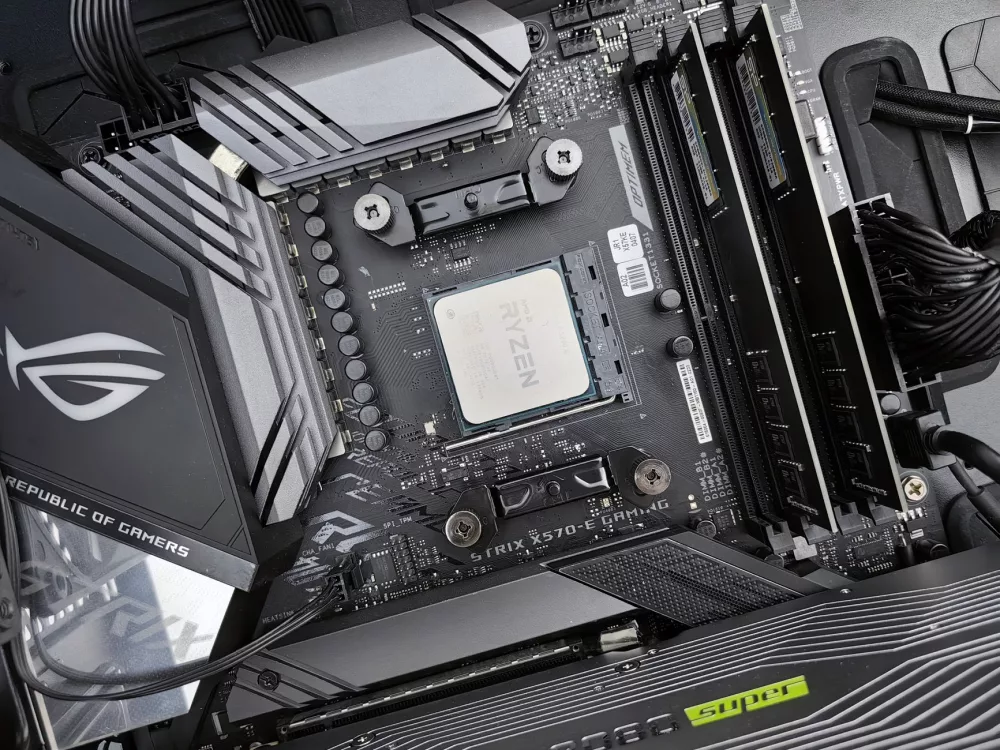
- Central Processing Unit (CPU) - The Brains of the Operation: This is arguably the most critical component for streaming, especially if you're encoding with software like x264. You'll want something with plenty of cores and threads.
- For Intel, I'd suggest looking at an Intel Core i7 or i9 (10th generation or newer). Something like an i7-12700K or i9-13900K offers fantastic single-core performance for gaming and enough cores for encoding tasks.
- On the AMD side, the Ryzen 7 or Ryzen 9 series (5000 series or newer) are phenomenal choices. A Ryzen 7 5800X3D or a Ryzen 9 7900X are powerhouses that excel in multi-threaded workloads, which is exactly what streaming demands.
- Graphics Processing Unit (GPU) - Rendering Power: While the CPU handles most software encoding, your GPU is still super important for gaming and, increasingly, for dedicated hardware encoding.
- NVIDIA cards with their NVENC encoder are often the go-to for streamers. NVENC is incredibly efficient, providing excellent stream quality with minimal performance impact on your gaming framerate. A GeForce RTX 3060Ti or higher (e.g., RTX 4070, 4080) is an excellent starting point.
- AMD cards also offer good encoding capabilities, particularly with their newer generations. If you're team red, look at an RX 6700 XT or higher (e.g., RX 7800 XT).
- The key here is that if you're doing a single-PC setup, you need a GPU strong enough for your gaming *and* efficient encoding. For a two-PC setup, the dedicated streaming PC's GPU often doesn't need to be as powerful, as its primary job is often just display output and possibly some minor effects, relying on the CPU or an internal capture card for encoding.
- Random Access Memory (RAM) - Your System's Workspace: Don't skimp here! While 16GB is a minimum for gaming, for streaming, I strongly recommend 32GB of RAM. This gives your system plenty of headroom for your game, OBS, web browsers, chat clients, and any other applications you might be running.
- Aim for a speed of at least 3200MHz, and ideally 3600MHz or faster, especially for AMD Ryzen CPUs, which benefit greatly from faster memory.
- Motherboard - The Foundation: This is what everything plugs into. You'll need one compatible with your chosen CPU (e.g., LGA 1700 for Intel 12th/13th Gen, AM5 for AMD Ryzen 7000 series). Look for features like:
- Enough PCIe slots if you plan on adding a capture card or other expansion cards.
- Ample USB ports for all your peripherals (webcam, mic, stream deck, etc.).
- Good VRMs (Voltage Regulator Modules) if you plan on overclocking your CPU.
- Wi-Fi 6E is a nice-to-have, but a wired Ethernet connection is always preferred for streaming stability.
- Storage - Speed and Space: You need both!
- A primary NVMe SSD (1TB or more) is essential for your operating system, frequently played games, and streaming software. The speed of an NVMe drive will dramatically improve load times and overall system responsiveness.
- A secondary SATA SSD (1TB or more) can be great for less-demanding games or storing recorded footage that you plan to edit later.
- If you record a lot of content, a large HDD (4TB+) can be a cost-effective solution for long-term storage of raw footage.
- Power Supply Unit (PSU) - The Heartbeat: Never cheap out on your PSU! It provides power to all your components.
- Calculate your estimated wattage and then add a buffer. For a typical gaming and streaming PC with a decent GPU and CPU, 750W to 850W is a good sweet spot. More powerful rigs might need 1000W+.
- Look for an 80 Plus Gold or Platinum rating for efficiency and reliability. Modular PSUs also make cable management much, much easier.
- Case - Your PC's Home: This is largely personal preference, but consider airflow and size.
- A case with good airflow is crucial for keeping your components cool and preventing thermal throttling, which can degrade performance.
- Make sure it can accommodate your chosen motherboard size (ATX, Micro-ATX, etc.) and your large graphics card.
- Good cable management options will make your build look clean and improve airflow.
- Cooling - Keeping Things Chill: High-performance components generate heat, and too much heat means lower performance.
- For powerful CPUs, an AIO (All-In-One) liquid cooler (240mm or 360mm) or a high-end air cooler like the Noctua NH-D15 or Deepcool AK620 is highly recommended.
- Ensure you have enough case fans for optimal airflow – typically two intake and one or two exhaust fans.
Essential Peripherals for a Top-Tier Stream
Your PC is the engine, but these are the accessories that let you connect with your audience.
- Microphone: Your audio quality is paramount. Seriously, people will forgive a less-than-perfect video before they forgive bad audio.
- A USB condenser microphone like the Blue Yeti or Rode NT-USB Mini is a great starting point.
- For higher quality, consider an XLR microphone (e.g., Shure MV7, Rode Procaster) paired with an audio interface like a Focusrite Scarlett 2i2. This combo offers professional-grade sound.
- Webcam: Viewers want to see your reactions!
- The Logitech C920/C922 series are popular and affordable.
- For a step up, look at the Logitech StreamCam or even a mirrorless/DSLR camera with a capture card for a truly cinematic look.
- Capture Card (for Two-PC Setups or Console Streaming): If you're running a two-PC setup (one for gaming, one for streaming) or streaming from a console, you'll need one of these.
- Internal capture cards like the Elgato Game Capture HD60 Pro or 4K60 Pro are excellent for dedicated streaming PCs, offering low latency.
- External capture cards like the Elgato HD60 S+ or AverMedia Live Gamer Portable are more flexible and great for console streaming or if you need portability.
- Lighting: Good lighting makes a massive difference in how professional your stream looks.
- A simple ring light or a couple of LED panel lights can illuminate your face and make you pop on camera.
Software and Setup Considerations
Once you have all your shiny new hardware, it's time to get it talking to each other!
- OBS Studio or Streamlabs OBS: These are the industry standard for broadcasting. Learn one of them inside out. They're powerful and highly customizable.
- Drivers: Make sure all your component drivers are up-to-date. Graphics card drivers, chipset drivers, audio drivers – keep them current for optimal performance and stability.
- Internet Connection: All the powerful hardware in the world won't save a bad internet connection. A stable, fast upload speed (at least 10-15 Mbps for 1080p streaming) is non-negotiable. Use a wired connection if at all possible!
A Few Final Tips
Building a PC can seem daunting, but it's super rewarding. Take your time, watch some build guides, and don't be afraid to ask for help.
- Budget Wisely: Decide on a budget beforehand and try to stick to it. Prioritize the CPU and GPU, then RAM, and don't skimp on the PSU.
- Cable Management: It's worth the extra effort. A tidy interior looks better and improves airflow, keeping your components cooler.
- Future-Proofing: While you can't truly future-proof, investing in slightly better components than you think you need now can save you an upgrade down the line.
Building a dedicated streaming PC is an investment in your content and your audience's experience. It allows you to produce high-quality, smooth streams without the compromises. I really believe that taking this step will elevate your content and make the whole streaming process more enjoyable and less stressful for you. Happy building, and happy streaming!